|
Making More Windows |
|
|
If you follow this sequence, you should be successful:
|
|
Begin Your New Project from Scratch in the Usual Way |
|
|
File / New / VCL Forms Application - C++ Builder |
 |
|
Before you press the Green Arrow... |
 |
|
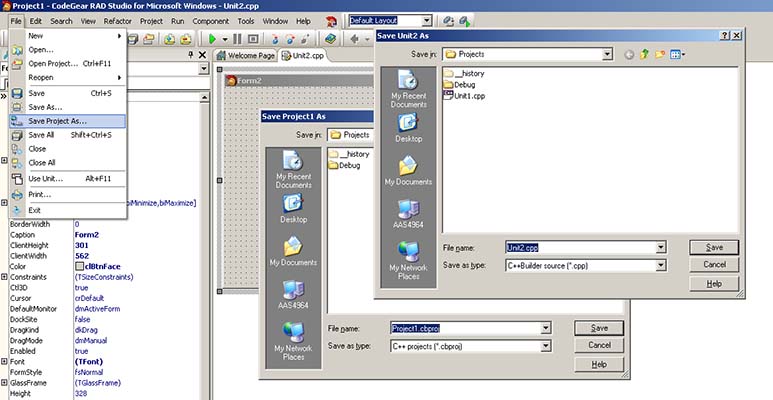
File / Save Project As... and accept the defaults, twice. |
 |
You may now press the Green Arrow... |
|
How to Add a New Window to Your Project |
|
|
File / New / Form creates a new Form2 and a new Unit2 to go with it |
 |
|
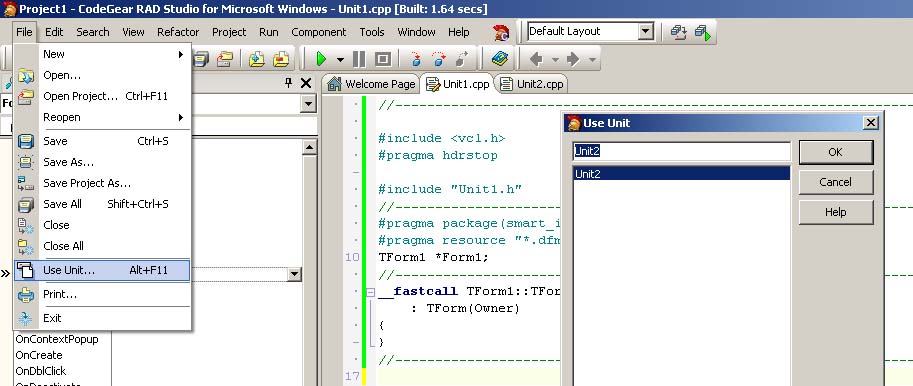
Go to Unit2.cpp File / Use Unit... Select Unit1 |
 |
|
Go to Unit1.cpp File / Use Unit... Select Unit2 |
 |
|
File / Save All |
 |
You may now press the Green Arrow... |
|
Add Code to Manipulate the New Window |
|
|
Add a Button to Form1 In its event handler, set Form2->Visible = true; Press the Green Arrow to test it... |
 |
|
If you want the variables in Unit1 on Form1 |
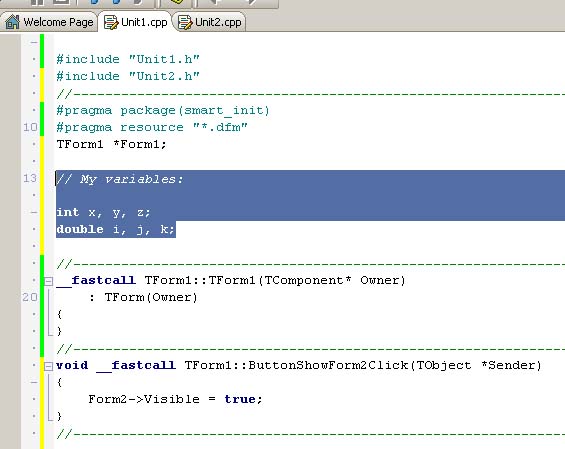 |
to be available on Form2, declare them again in Unit2, prefacing
them with the word "extern" |
 |
That's All there is to It... |
|